










Compare Unmixr vs Murf AI

Unmixr vs Murf AI for L&D workflows

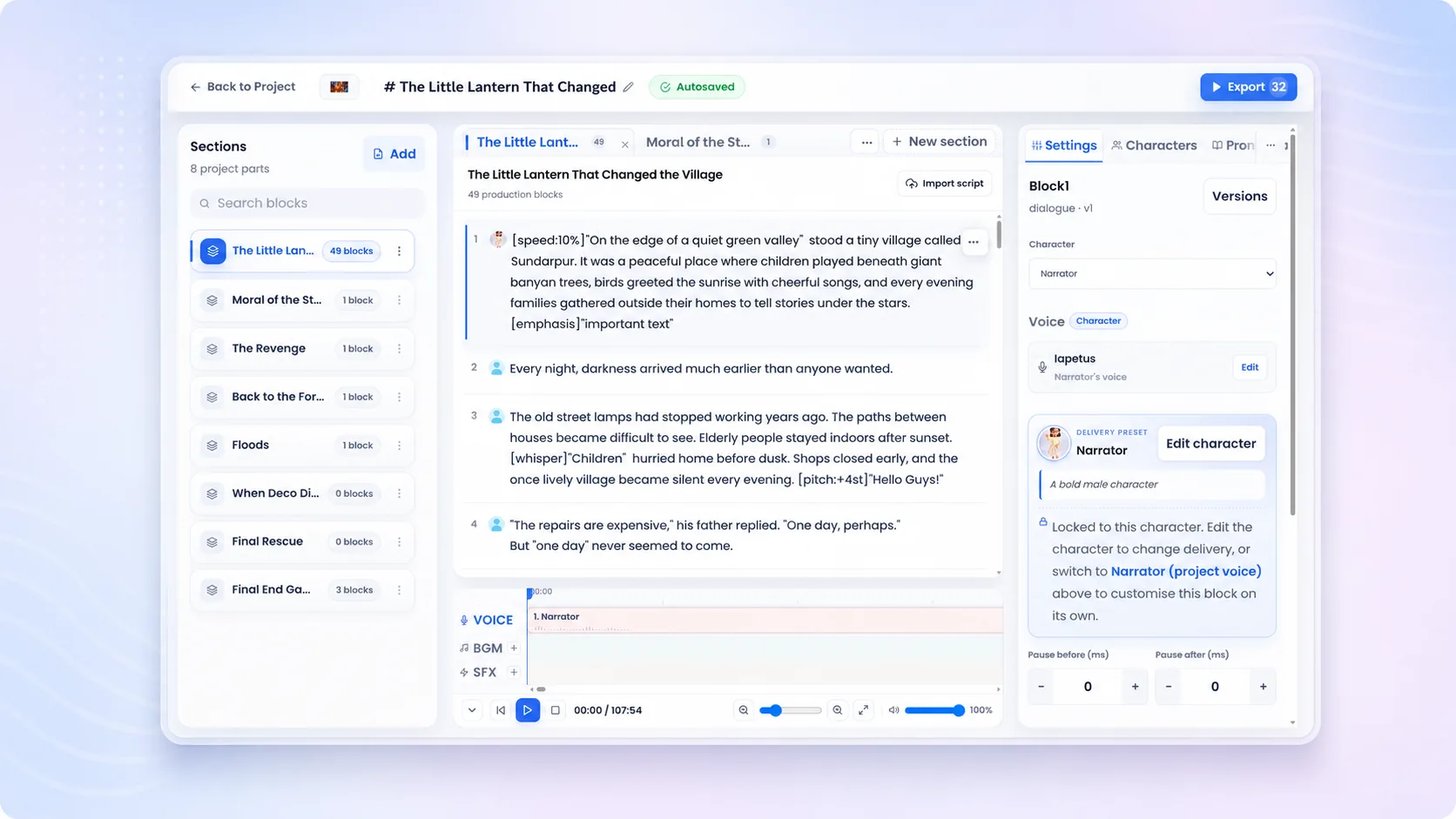
Murf AI is a voiceover tool. Unmixr is designed as a broader AI voice studio for training videos, courses, dubbing, subtitles, and transcription.

Trusted by 100K+ users 100M+ minutes generated No credit card needed
Unmixr vs Murf AI Built in Unmixr
Unmixr AI voice studio

How it works

Voiceover is step two. Unmixr covers what comes before it — and everything after.

1

Start from real course material

Import a slide deck, lesson script, or existing video. Unmixr turns it into a structured, editable project.

2

Generate the voiceover

Cast a voice across 100+ languages with learning-grade pacing and pronunciation control.

3

Finish the module, not just the audio

Add captions and transcripts, convert slides to video, or dub the result into other languages — same project.

4

Publish everywhere your learners are

Export video for the LMS, audio for podcast-style learning, and subtitles for accessibility.

What you get with Unmixr

Built for L&D teams and creators comparing AI voiceover software — voice, video, subtitles, transcription, and dubbing in one place.

E-learning narration

Create consistent voiceovers for learning modules and tutorials with instructor-style delivery. Pacing and pronunciation controls are tuned for comprehension.

PowerPoint to Video

Turn course slides into narrated videos for LMS and internal training. The deck you already have becomes the finished module.

Dubbing support

Translate and dub videos when your audience spans languages — 100+ of them. Localization is a built-in step, not a second product.

Transcripts and captions

Support accessibility and review workflows with text outputs generated alongside the audio. Every module can ship captioned by default.

Learning-grade delivery control

Pauses, emphasis, speed, and per-term pronunciation rules keep long lessons clear. Fixes apply project-wide, so they never need repeating.

Multi-speaker scenarios

Role plays, branching scenarios, and dialogue-based lessons get distinct voices per character from a single script.

Workflows teams compare on

Real jobs-to-be-done, each connected to the Unmixr studio that handles it.

E-learning voiceover

Consistent narration for LMS modules with captions and transcripts included by default.

See e-learning voiceover →

Training video narration

Slides and scripts become narrated, captioned training videos — not just audio tracks.

See training videos →

Course localization

Dub and subtitle finished modules into the languages your teams actually speak.

Localize course videos →

Podcast and audiobook narration

Long-form and multi-speaker audio workflows beyond business voiceover.

See podcast voices →
100M+
Minutes of audio and video generated by creators worldwide
100+
Languages across voiceover, transcription, subtitles, and dubbing
80+
Voice-cloning languages for a consistent brand narrator

Unmixr vs Murf AI at a glance

A workflow-first comparison for teams producing courses, training videos, and multilingual content.

Workflow Unmixr Murf AI
E-learning voiceover Learning-first narration with pacing, pronunciation rules, and block-level regeneration. Established AI voiceover studio widely used for e-learning narration.
Slides to video Full PowerPoint-to-Video conversion: decks become narrated, captioned video modules. Voiceover-led workflow; positioned around adding voice to content.
Dubbing and localization End-to-end: transcribe, translate, subtitle, and dub course videos in 100+ languages. Focused primarily on voiceover generation.
Transcription and subtitles Transcription, captions, and translated subtitles included in the same suite. Centered on studio-quality voiceover output.
Long-form narration (audiobooks, podcasts) Dedicated audiobook and podcast workflows with chapters and multi-speaker dialogue. Supports voiceover projects; positioning centers on business voiceover.
Voices and languages A voice for every use case across 100+ languages, with multilingual and instruction-following LLM voices; voice cloning in 80+ languages. Offers a large multi-language voice library.
Getting started Free to try; paid and LTD plans include commercial use. Free trial available; published plans scale by usage and features.

Based on each product's public positioning at the time of writing. Always check both providers' sites for current features and plans.

FAQ

Unmixr vs Murf AI: your questions, answered

Straight answers for teams evaluating this workflow.

Is Unmixr a Murf AI alternative?

Yes. Unmixr is a Murf AI alternative for teams that need AI voiceover plus dubbing, transcription, subtitles, and training-video workflows — the full production path rather than the voice step alone.

Which is better for e-learning: Unmixr or Murf AI?

Both generate quality voiceover. Unmixr is the stronger fit when modules also need captions, slide-to-video conversion, or localization, because those steps run in the same project instead of separate tools.

Which is better for training videos?

Unmixr — training videos need narration plus subtitles, slide-to-video conversion, and often localization, and Unmixr handles that chain in one platform.

Does Unmixr include dubbing, unlike a voiceover-only workflow?

Yes. Unmixr includes a complete dubbing pipeline — transcription, editable translation, voice generation, and subtitles — so finished videos can be localized without extra software.

Can Unmixr handle podcast and audiobook voiceovers too?

Yes. Unmixr supports podcast, audiobook, narration, and multi-speaker dialogue workflows in addition to L&D use cases, with chapter organization for long-form projects.

How many voices and languages does Unmixr offer compared to Murf AI?

Unmixr covers 100+ languages with a voice for every use case, instruction-following LLM voices, and voice cloning in 80+ languages. Murf AI also offers a multi-language library — the practical test is auditioning both on your own script.

Can I try Unmixr free before switching from Murf AI?

Yes. Unmixr is free to get started — bring one real lesson script, audition voices on it, and export a test module before deciding.

Go beyond voiceover

Create narrated, captioned, localized learning content with Unmixr — starting with the lesson you already have.

Create with Unmixr

Free to get started · A voice for every use case · 100+ languages

Still have a question?

If you have a specific use case or need help configuring a custom workflow, our team is always here for you. We would love to listen to your needs!