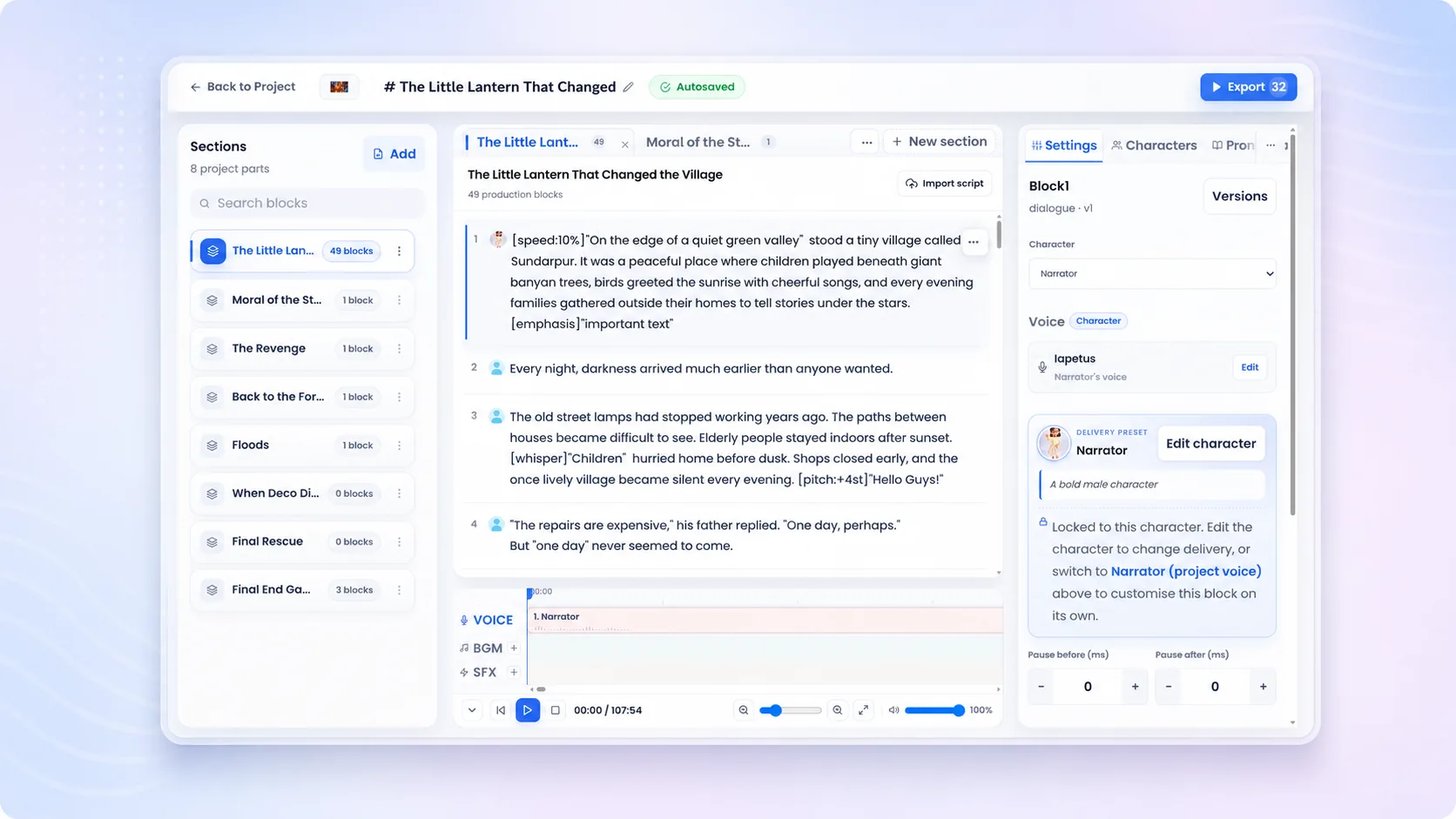
Workflow YouTube narration workflow

AI YouTube Voiceover and narration

Turn a script into a finished YouTube narration with realistic AI voices, then add subtitles and dub the same video for other languages — all from one project, without a microphone or a re-record.

500M+ minutes generated No credit card needed
YouTube narration workflow
Unmixr AI voice studio

How it works

From script to uploaded video: narration, captions, and a localized version, without booking a recording session.

1

Paste your script

Drop in the script for your next video. Unmixr splits it into blocks you can voice, re-word, and re-time individually — so a rewrite never means re-reading the whole thing.

2

Cast a narrator

Audition voices by language, tone, and delivery until one fits the channel, or clone your own so every upload sounds like you even on the weeks you cannot record.

3

Direct the read

Adjust pacing, emphasis, and pronunciation line by line. Names, brands, and jargon get locked in once and stay right across every future video.

4

Export audio, captions, and dubs

Download the narration for your editor, generate subtitles for the upload, and dub the finished video into other languages from the same project.

Hear it first

What your next upload could sound like.

A few of the formats YouTube runs on, each directed for the job rather than read flat — and a sample of what the studio does, not the extent of it. Play them back to back: the script for every one is printed beside its player, and nothing was cleaned up after export.

  • Original generated audio
  • Scripts included
  • No sign-up to listen
YouTube narration examples

Every format wants a different read.

A video essay, a tutorial walkthrough, a countdown, a story-time read, a product review, a short-form hook - each one directed for the job rather than read flat. These are examples of what the generator gets pointed at, not a list of what it handles: bring any script and the same controls apply. Every script is printed beside its player and nothing was retouched after export.

Any format you publish

Can an AI voice sound right for YouTube? Yes - the format is what decides the read. A video essay wants unhurried and analytical, a countdown wants momentum, a story-time channel wants restraint. The same generator produces whichever one you direct it toward.

Draven Essay narrator
Studio

Video essay

Every few years a company decides the fix is another dashboard. More charts, more alerts, more colour. And every time, the same thing happens: the people closest to the problem stop reading any of it. The failure was never visibility. It was that nobody was allowed to act on what they could already see.

Unmixr AI voice
0:23
Lyra Tutorial narrator
Studio

Tutorial walkthrough

Before we touch a single setting, open the project panel on the left. That is where everything we do today is going to live. If yours looks completely empty, good, you are exactly where you should be. We will fill it in three passes, and you can pause after each one.

Unmixr AI voice
0:18
Arden List host
Studio

Countdown and list

Number four is the one that took the internet down for nine hours. And honestly? It should have. Because nobody in that building thought to ask the one question a twelve-year-old asked on day one. We will get to what they did next. But first, number three.

Unmixr AI voice
0:15
Asha Story narrator
Studio

Story time

She had worked the night desk for eleven years, so she knew the sound the elevator made when it stopped on four. It had not stopped on four since the building closed that floor. It was ten past three in the morning. She wrote the time down before she went to look.

Unmixr AI voice
0:24
Daniel (Persona) Review narrator
Persona

Product review

Two weeks in, here is where I have landed. The battery holds up better than the spec sheet suggests, the screen is genuinely excellent, and the software is about a year behind. Coming from something three years old, you will be delighted. Coming from last year's model, do not bother.

Unmixr AI voice
0:15
Grace (Persona) Short-form narrator
Persona

Short-form hook

Stop scrolling, because you are about to waste the best ninety seconds of your morning. There is one setting on your phone, buried three menus deep, quietly draining your battery all day long. Switch it off, then look again tonight.

Unmixr AI voice
0:14

These are the clips we recorded for this page, not the limit of what it does - then dub the finished video into any of 100+ languages.

Narrate your script free

Everything this workflow needs

Built for YouTube creators, faceless channel operators, video editors, and educators — voice, video, subtitles, transcription, and dubbing in one place.

Voices that fit the channel

Audition narrators by language, tone, and delivery instead of settling for one generic reader. Pick the voice that suits a documentary essay, a tutorial, or a fast-cut explainer.

Direct the delivery

Control pacing, emphasis, and pauses line by line so the narration lands with your edit rather than fighting it. Slow down for the reveal, pick the pace back up after.

Pronunciation that sticks

Teach Unmixr how your channel says product names, places, and jargon once. Every later video inherits the same pronunciation instead of re-litigating it.

Re-cut without re-recording

Change a line after the edit is locked and regenerate only that block. The rest of the narration is untouched, so nothing needs to be matched by ear.

Subtitles from the same project

Export SRT or VTT captions alongside the audio so uploads ship accessible and indexable from day one — no separate captioning pass.

One video, more audiences

Dub a finished video into 100+ languages with translated subtitles, and turn a single upload into a multi-market catalogue.

Where teams use this workflow

Real jobs-to-be-done, each connected to the Unmixr studio that handles it.

Faceless channels

Publish on a schedule without ever being on camera or at a mic — script, narrate, edit, upload.

Try the voice generator →

Explainer and tutorial videos

Give walkthroughs and how-tos a steady, clear narrator that keeps pace with what is on screen.

See video narration →

Reach international viewers

Dub a video that already performs into the languages your analytics say you are being watched in.

Explore AI dubbing →

Subtitles for every upload

Generate accurate captions so your videos stay watchable on mute and searchable in results.

Generate subtitles →
500M+
Minutes of audio and video generated by creators worldwide
100+
Languages across voiceover, transcription, subtitles, and dubbing
80+
Voice-cloning languages for a consistent brand narrator
FAQ

AI YouTube Voiceover: your questions, answered

Straight answers for teams evaluating this workflow.

What is the best AI voiceover for YouTube videos?

The one your audience forgets is AI. Unmixr lets you audition narrators by language, tone, and delivery, then direct pacing and pronunciation line by line — so the read fits your edit instead of sounding like a text reader. You can also clone your own voice and keep the channel consistent.

Can I use AI narration on a monetized YouTube channel?

Yes. Audio you generate with Unmixr is 100% cleared for commercial use on any purchased plan, which covers monetized uploads, sponsorships, and client work. YouTube's own policies ask that videos add original value rather than being mass-produced, so use the narration to deliver your script, not to auto-publish filler.

How do I make a faceless YouTube video?

Write the script, generate the narration, edit it against your footage or visuals, then add captions before uploading. Unmixr covers the narration, subtitles, and optional dubbing part of that loop, so the only thing you have to bring is the script and the edit.

Can I clone my own voice for my channel?

Yes — consent-first voice cloning is supported in 80+ languages. It is how creators keep uploading in their own voice during a busy week, a travel stretch, or a lost-voice week, and how a channel keeps one narrator across hundreds of videos.

Can Unmixr dub my YouTube videos into other languages?

Yes. Upload the finished video, and Unmixr transcribes it, translates the script, and voices it in your target language with subtitles to match. You review every line before anything is spoken, so a mistranslation never reaches the upload.

Will I get subtitles as well as narration?

Yes. Captions come out of the same project as SRT, VTT, or plain text, so you can upload them with the video instead of relying on auto-captions.

How long does it take to narrate a video?

Minutes. A typical script becomes a full narration draft almost immediately, and most of the remaining time goes into directing a few lines — pacing, a name, a pause — rather than re-recording takes.

Narrate your next upload today

Paste a script, cast a narrator, and export the voiceover with captions — then dub it for the audiences already watching you from abroad.

Narrate Your Next Video

Free to get started · A voice for every use case · 100+ languages

Still have a question?

If you have a specific use case or need help configuring a custom workflow, our team is always here for you. We would love to listen to your needs!